
Optivis CMSLive demo
Try Optivis CMS with a forwarder's week already in it.
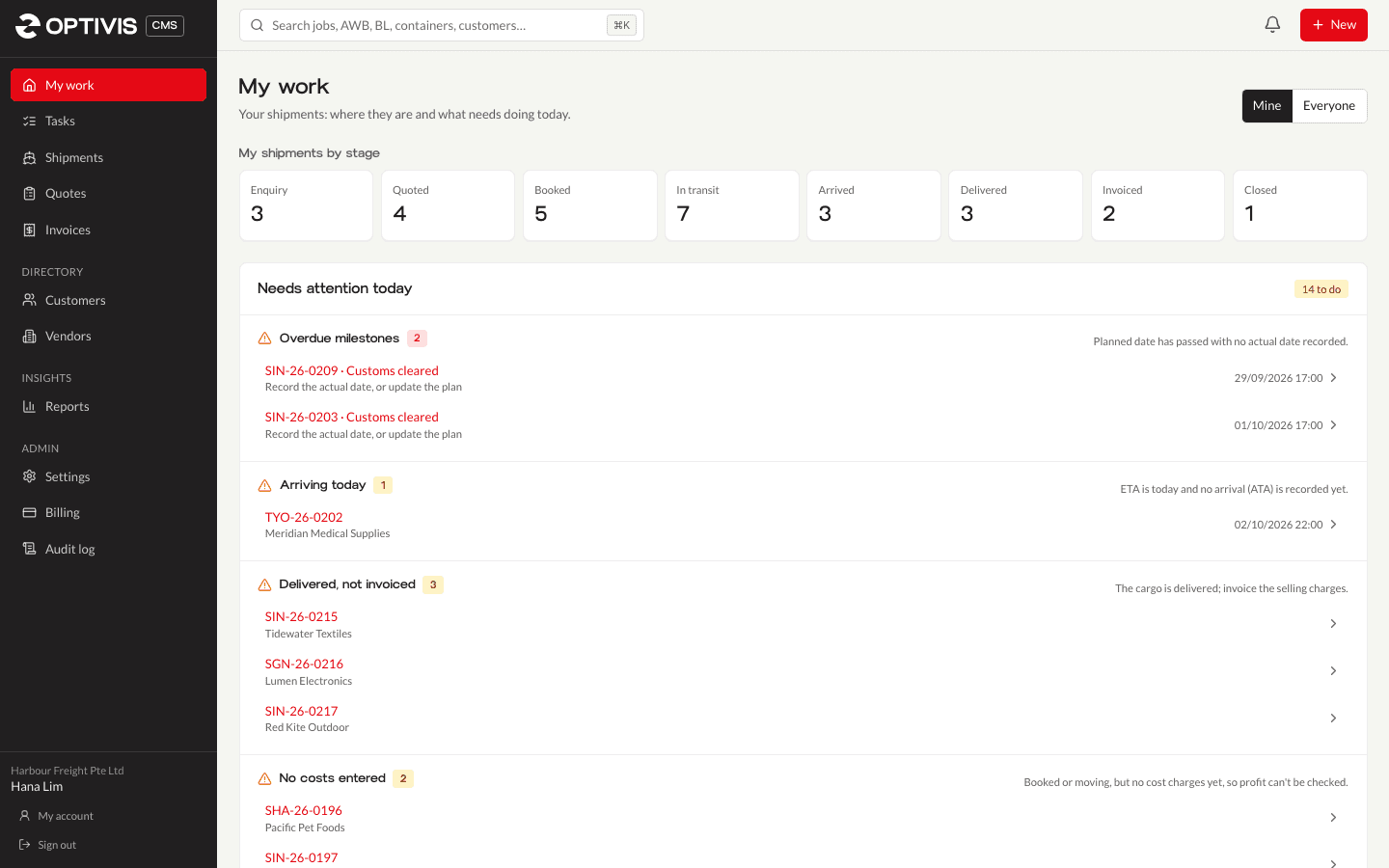
The live demo is a working workspace of Optivis CMS, the cargo management system for freight forwarders. It holds 36 sample shipments across every stage, with quotes, invoices, 12 customers and 4 vendors. Sign in with the shared details, change anything you like, and it resets itself afterwards.
The demo sign-in
Shared by every visitor. It's filled in for you on the demo's sign-in page.
demo@optivis.co
Password
try-optivis-demo
Opens the demo workspace's sign-in page.
01
What you can try
Everything a forwarder does in a day works in the demo. These are good places to start.
Follow jobs through all eight stages
My work and the shipment list show every job's stage, from enquiry and quoted through booked, in transit, arrived and delivered to invoiced and closed.
Create a shipment
Add an air or sea job with the shipment wizard: customer, route, dates and cargo lines. It appears at its stage straight away.
Quote, then book
Write a quote with freight, handling and documentation lines and download it as a PDF. When a quote is accepted, its price becomes the shipment's selling charges.
See profit per job
Add costs and selling charges in any currency on a shipment and see the profit, in the workspace's base currency, as you go.
Invoice and close
Raise an invoice from a delivered job's selling charges, download the PDF, and record payment to close the job.
Pre-alerts, tracking, tasks
Write a pre-alert with documents attached, open a customer tracking link, and work through tasks and milestones that are due.
02
What's switched off, and how it resets
The sign-in is public, so anything that would reach outside the demo workspace is switched off. The rest works as it does in your own workspace.
- Nothing is sent. Pre-alerts, quotes, invoices and invitations show a message saying they would have been sent.
- Xero
- The Xero connection can't be set up.
- Users and roles
- No inviting people, and no changes to users, roles, or the demo sign-in's e-mail address and password.
- Workspace settings that reach outside
- No change of workspace address, billing, data export, deletion requests or support access.
- Limits
- Uploads are limited to 2 MB, and there's a lower limit on how fast you can click through.
03
Questions about the demo
- Do I need to sign up to use the demo?
- No. The demo has one shared sign-in, shown on this page and filled in on the demo's sign-in page. You can look around and make changes without giving us any details.
- Can other people see what I do in the demo?
- Yes. Everyone uses the same demo workspace, so another visitor may see a shipment you added. Don't enter real customer or personal information.
- Are my changes kept?
- No. The demo resets itself to the sample data once nobody has used it for 15 minutes after a sign-out, and again every night. To keep your work, start your own workspace.
- Is the demo the real product?
- Yes. It's the same Optivis CMS a workspace of your own runs, with sample data loaded and the features that reach outside the workspace, such as e-mail and Xero, switched off.
Ready to run your own jobs?
Your own workspace keeps everything you add, sends your pre-alerts, quotes and invoices, and connects to Xero.
Early access opens soon: a 14-day free trial of Pro, no card needed